
Peakaboo for XRF Analysis
What is Peakaboo?
Peakaboo is a free, open-source tool for analyzing X-ray fluorescence (XRF) spectra. It helps you fit peaks, reduce noise, and create 2D maps showing where different elements are located in your samples — going well beyond simple region-of-interest (ROI) analysis while keeping a gentle learning curve. It asks only a working familiarity with your data, so researchers, students, and industry alike can reach solid results quickly and with confidence.
Dataset Support
Peakaboo reads data from a variety of sources, from single-point scans to comma-separated value (CSV) files and more complex HDF5-based formats. Because format support is handled through plugins, additional dataset formats can easily be added at any time from the plugin catalogue.
Analysis Features
Peak Fitting
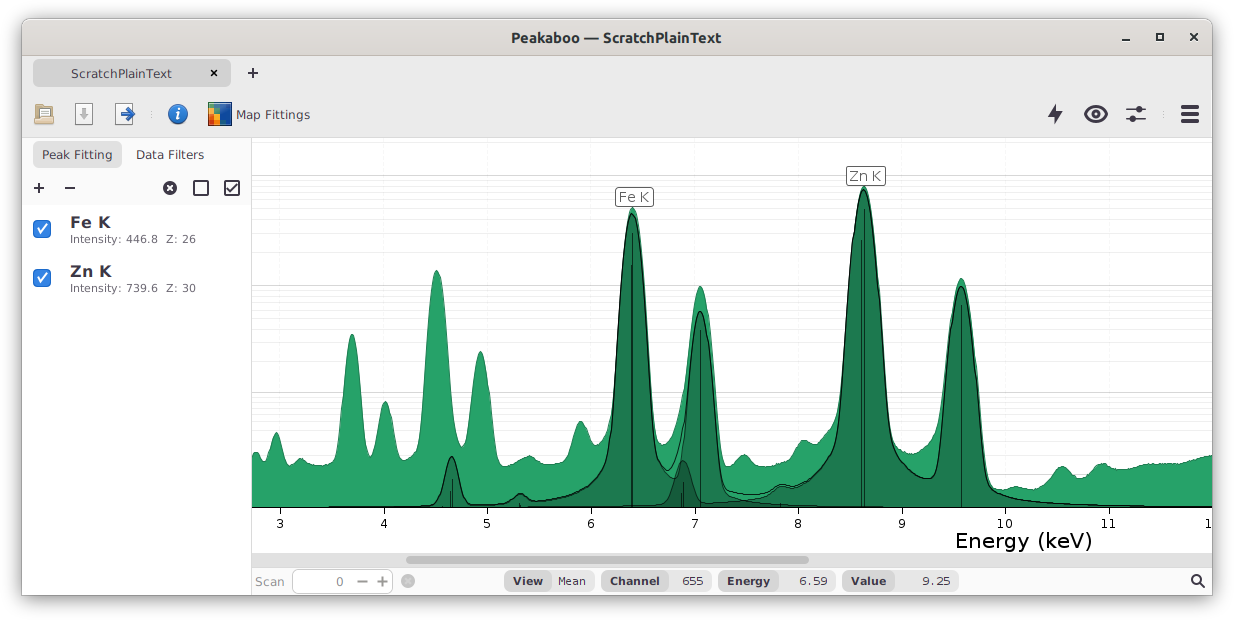
The spectra produced are fitted with several K, L, or M lines for each element. The line positions and relative intensities for each line series were taken from several tabulated sources, including Xraylib. For fitting of the spectral peaks, a Pseudo-Voigt function is used. Thus, the identification of a particular element requires a close fit of multiple lines in the spectrum, each with its own shape.
Results Mapping

Once peak fitting has occurred, one or two dimensional data sets can be mapped to show the distribution of the selected elements. Peakaboo can show individual elements, composites of several elements, ratios of sets of elements, or overlays of multiple sets of elements.
Noise Reduction
Noise reduction is essential since the spectra are taken at very brief intervals while the sample is scanned in the X-Ray beam. The software provides a number of mathematical filters that are used in noise reduction or in background attenuation or removal. Noise filters include moving average, fast Fourier transform (FFT) low pass, Savitzky-Golay, and others.
Where applicable, noise removal filter parameters can be adjusted to suit the data in question. Best noise reduction with minimum change in peak shape is often achieved using a Savitzky-Golay filter.
Background Removal
Background removal or reduction is particularly important for spectra acquired using white radiation. Peakaboo has a number of background removal filters of varying sophistication and performance. Varying levels of background can be removed.
User Extendable
Peakaboo allows users who are comfortable with Java programming to extend Peakaboo in four ways:
- Data Sources
- Data Sinks
- Spectrum Filters
- Map Filters
To get started creating your own filters or file format support, all you need is the Peakaboo JAR to build against. For more information on creating plugins, see the user manual.